Session: an hour. You need: a Canva account, even a free one (for the office's brand templates, a paid plan); Claude on a paid plan, for the Design part; a real occasion, an event to announce or a visual identity to propose.
Two different jobs, two tools. The first is everyday graphics, the post and the flyer in the office template: Canva does it, the graphics program many offices use, with the model talking to it through a connector: it creates designs in your account, searches the ones you already have, exports them, and in the paid plans uses the brand templates, the ones the office has prepared with logo and colours. The design stays in Canva, where you finish it yourself. The second job is the proposal: three directions for a client's visual identity, a mark to discuss, the cover of a series. Claude Design does it, the mode that appears as Design in the "/" menu of Claude's chat: it opens a canvas beside the conversation, you review and correct it in words or with the editing tools, and every element can be downloaded as PNG, PDF or HTML.
1. Connecting Canva
Canva's connector is added from the settings of Claude, ChatGPT or Copilot, and Canva has a guide for each. In a Canva team the administrator has to turn it on first, from the third-party integration controls.
2. The request, with your text
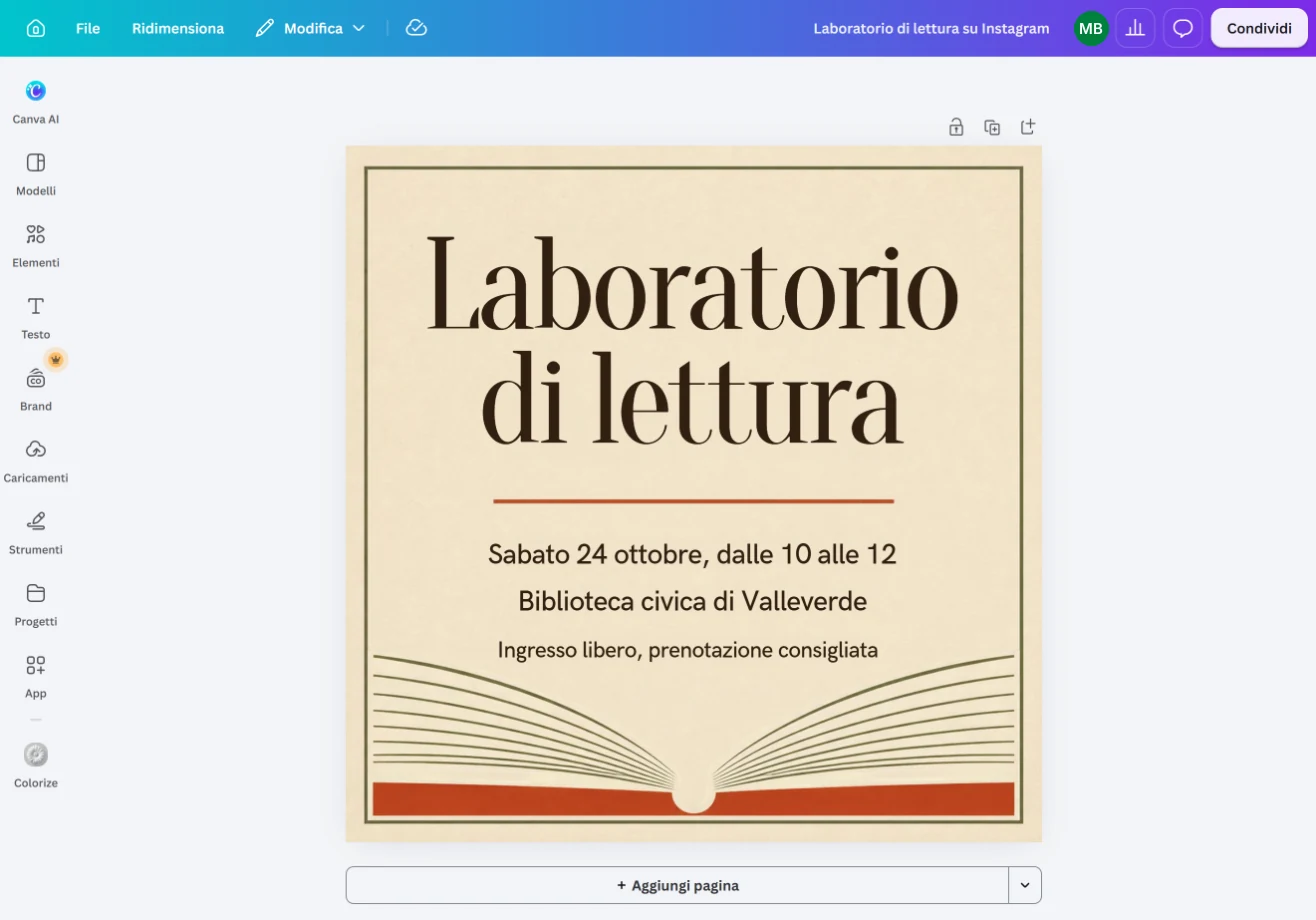
You write the text, and ask for the form: "In Canva create three variants of a square post to announce the reading workshop on Saturday 24 October, from 10 to 12, at the library. Use exactly this text: [text]. Sober style, warm colours, no images of people." The text given by you is the simplest check: what you did not write must not appear.
3. Brand templates
If the office has shared brand templates, ask to start from those: "Search the brand templates for the one for events and fill it with these data." Logo, fonts and colours are right from the start. With many events to announce, the same template is filled from a list, and that is the part where most time is saved.
4. Finishing and exporting
Open the variants in Canva, choose, and finish there: moving an element with the mouse costs less than describing it. Before exporting, check dates, times and names letter by letter, the logo, the sizes required by the channel you will publish on. Then export, from Canva or by asking in the chat.
5. The proposal: the brief
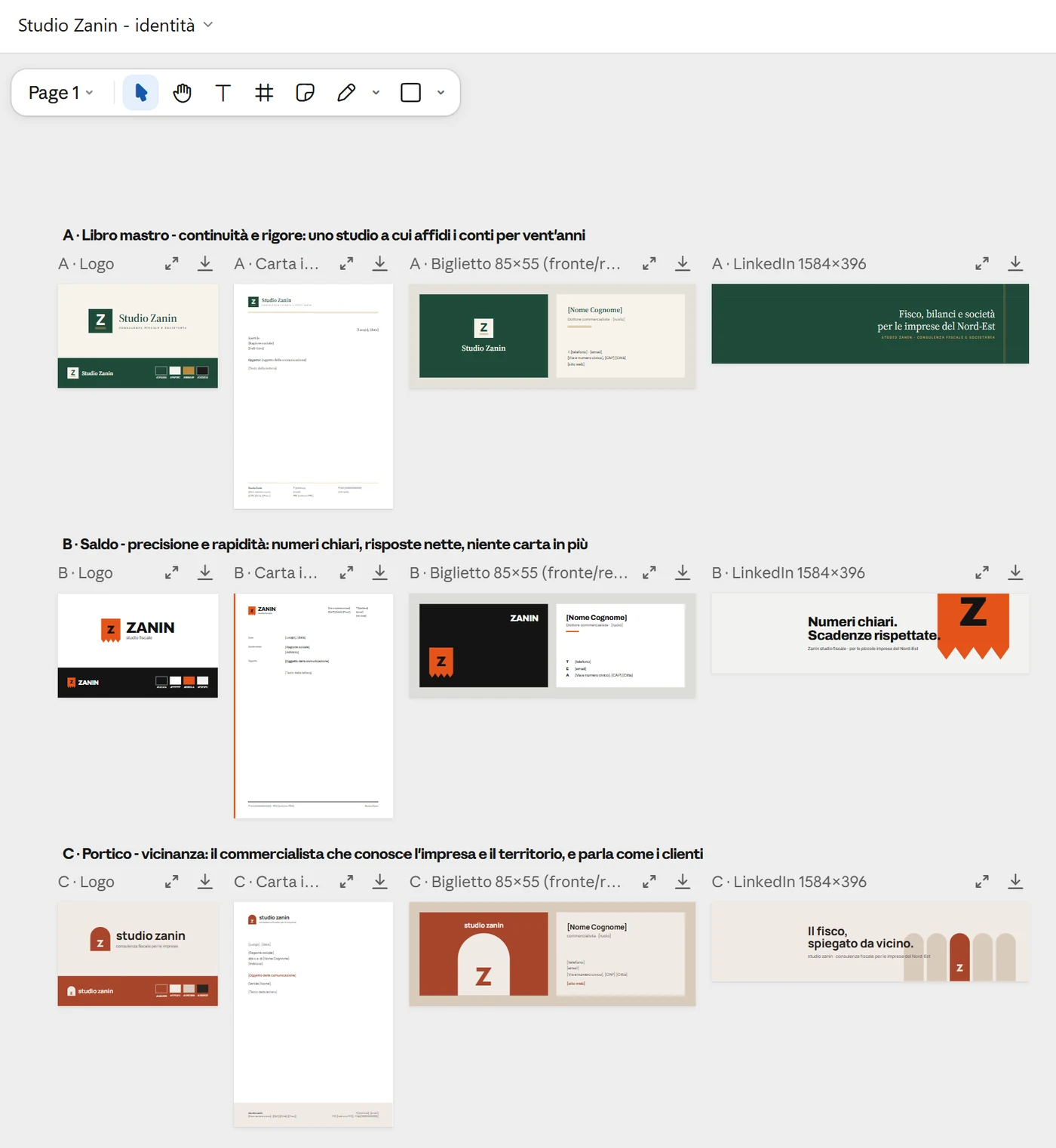
For the visual identity start from the brief, as with a real designer: "Tax advisory firm, eight people, clients are small businesses in north-east Italy. They want to look solid and modern, without the banks' blue. Needed: logo, letterhead, business card, LinkedIn header. Three directions different from one another, each with one line saying what it communicates." You write the brief, and what you did not write, the name of a fashionable typeface, a symbol, is not for it to decide.
6. Three directions, in Claude Design
Open Design from the "/" menu and paste the brief. In the test for this guide three directions arrived, each with a name and a line ("Ledger", "Balance", "Portico"), already laid out on the four pieces, logo, A4 letterhead, 85x55 business card front and back, 1584x396 LinkedIn header, without anyone asking. Look at them as you would look at a supplier's boards: what each communicates, where it resembles something that already exists, whether it holds in black and white and at one centimetre. Then correct in words, one thing at a time: "The second: keep the palette, change the symbol, too similar to a bank's." In the test it redid only direction B, on all four pieces, and added on its own two risks of the new symbol to check, how it reads when small and what it evokes. Three rounds at most: beyond that, the brief was wrong.
7. The roll-out
Once the direction is chosen, ask for what the canvas does not say by itself: "For direction 2 give me the colour codes, the typeface names and the sizes used." Those codes are the deliverable: with them, whoever does the real work, in Canva, in Illustrator or at the printer, starts from an exact base. If the office works in Canva, the next step is to bring the chosen direction there as a brand template, and from there step 3 applies.
8. The check
In everyday graphics the check looks at the text: dates, times, names, logo, the channel's sizes. In the proposal it looks at originality: a generated symbol can resemble a registered trademark without the model knowing; before proposing it to a client you search the symbol and the name, and a trademark is filed after a prior-art search done by people who do it for a living. The model gives you three good directions in an hour; it does not give you the guarantee that they are free.
What you just saw
Two ways of putting the model to work on graphics. Inside a program, through the actions the connector gives it (stage 16): the quality comes from Canva and from the office's templates, from the model come the speed and the variants. Inside the chat, with a mode that draws: the quality comes from the brief, and the model is a fast supplier of alternatives to judge. In both the check is yours and looks at different things: the text in the first, because a well-made image with a wrong time does more damage than an ugly one; originality in the second.
In the book. Appendix Q "How the Model Context Protocol works", page 262; chapter 4, section 4.4 "The harness: the set-up around the model", page 89. The book on Amazon.
In Claude, ChatGPT, Copilot and Gemini
The connector is the same, and Canva lists it as available for all accounts, including the free one and the education one. Searching the brand templates requires a paid Canva plan; filling them automatically is not in the free plan or in Pro Lite. You only see the brand templates shared with you. Some actions, such as generating a design, use up Canva's monthly AI credits, and when they run out they stop until the renewal; the assistant has its own limits, separate from Canva's. I have not tried Canva's connector for Gemini: Canva's guides read on 20 October 2026 describe the ones for Claude, ChatGPT and Copilot. Claude Design is Claude's alone, on paid plans, in the desktop app and on the web; in the other three tools the proposal is done by generating images in the chat (fact sheet "Other uses"), without the canvas you correct piece by piece.